

The best prebuilt gaming PC for most people in 2026 is the Skytech Gaming O11 Vision with a Ryzen 7 7700X and an RTX 5070 12GB. It targets 1440p high-refresh play, ships with an 850W Gold ATX 3 power supply and a 360mm liquid cooler, and carries a 4.5-star average from nearly 2,000 buyers. Below it sit nine more prebuilts covering every tier from a low-cost first PC to a 4K-ready RTX 5070 tower.
Two things make 2026 an unusual year to shop. DDR5 memory and NAND flash prices pushed entry-tier machines higher than buyers remember, so the lowest capable prebuilt in this roundup no longer sits where it did two years ago. And the graphics card itself has become a lottery inside some listings, where the board partner can change depending on what is in the warehouse that week.
That is why we did not simply sort a catalog by price. Every machine below carries a discrete graphics card, a rating backed by a meaningful number of reviews, a seller with a stated warranty, and enough documentation that you can verify what is inside. We explain the full selection method further down. We also lean on what owners report after living with these machines, not just what the spec sheet promises.
Our team has spent the last several months reading owner reviews across these exact configurations and comparing part choices side by side, and the pattern is consistent: the graphics card and video memory decide how long the machine stays relevant, and the power supply and support decide how painful an upgrade or a failure becomes.
Table of Contents
- Top 3 Best Prebuilt Gaming PC (October 2026)
- All 10 Prebuilt Gaming PCs Side by Side in 2026
- How We Picked These Prebuilt Gaming PCs
- 1. Skytech O11 Vision RTX 5070 – Best Overall
- 2. iBUYPOWER Element Ryzen 9 RTX 5070 – Best Spec Sheet
- 3. CyberPowerPC Gamer Xtreme VR – Most Versatile
- 4. CyberPowerPC Gamer Master – Best Upgrade Path on a Shoestring
- 5. CyberPowerPC Ryzen 7 8700F RTX 5060 Ti – Best New-Generation Start
- 6. Skytech Crystal RTX 5060 Ti – Best Balanced 1080p Build
- 7. Olialia RTX 3060 Ti – Best for 1080p High Refresh
- 8. MSI Codex Z2 RTX 5070 – Best Storage and Memory Package
- 9. Alienware Aurora RTX 5070 – Best Onsite Service
- 10. STGAubron RX 580 – Lowest-Cost Way Into PC Gaming
- How to Choose a Prebuilt Gaming PC in 2026
- Match the graphics card to the monitor you own
- Read the video memory number before the model name
- Check memory capacity and whether the profile is on
- Treat the power supply as the upgrade enabler
- Cooling and fan noise decide daily happiness
- Check who is actually selling it
- Order your upgrades by difficulty
- Run this checklist in the first thirty days
- Prebuilt vs Building Your Own Gaming PC
- Frequently Asked Questions
- Who builds the best pre-built gaming PCs?
- Are any pre-built gaming PCs good?
- What is the best place to buy prebuilt gaming PCs?
- How long will a mid-range gaming PC last?
- Are prebuilt PCs worth it right now?
- Is a very cheap gaming PC worth buying?
- Is Skytech better than iBUYPOWER or CyberPowerPC?
- Does it matter who sells a prebuilt on Amazon?
- The Bottom Line on Prebuilt Gaming PCs in 2026
Top 3 Best Prebuilt Gaming PC (October 2026)
These three cover the widest range of needs. The Skytech O11 Vision is the default answer for 1440p gaming, the iBUYPOWER Element is the strongest spec sheet in the group, and the CyberPowerPC Gamer Xtreme VR is the cheapest machine here with a deep, proven review history.

All 10 Prebuilt Gaming PCs Side by Side in 2026
Every pick in this roundup appears below with its core configuration. Use the graphics card and video memory columns to match a machine to the monitor you already own, not to the monitor you might buy someday.
| Product | Specifications | Action |
|---|---|---|
| Skytech O11 Vision RTX 5070 |
|
Check Latest Price |
 iBUYPOWER Element Ryzen 9 iBUYPOWER Element Ryzen 9 |
|
Check Latest Price |
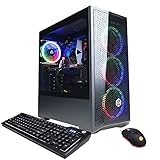 CyberPowerPC Gamer Xtreme VR CyberPowerPC Gamer Xtreme VR |
|
Check Latest Price |
 CyberPowerPC Gamer Master CyberPowerPC Gamer Master |
|
Check Latest Price |
 CyberPowerPC Ryzen 7 8700F CyberPowerPC Ryzen 7 8700F |
|
Check Latest Price |
 Skytech Crystal RTX 5060 Ti Skytech Crystal RTX 5060 Ti |
|
Check Latest Price |
 Olialia RTX 3060 Ti Olialia RTX 3060 Ti |
|
Check Latest Price |
 MSI Codex Z2 RTX 5070 MSI Codex Z2 RTX 5070 |
|
Check Latest Price |
 Alienware Aurora RTX 5070 Alienware Aurora RTX 5070 |
|
Check Latest Price |
 STGAubron RX 580 STGAubron RX 580 |
|
Check Latest Price |
How We Picked These Prebuilt Gaming PCs
Our filters ran in a fixed order, because the order changes which machines survive. We started with the graphics card, moved to the warranty, and only then looked at price.
1. A real discrete graphics card, no exceptions. Plenty of machines marketed as gaming desktops ship with integrated graphics only. We excluded those outright, along with machines whose card is too weak to run current titles at sensible settings.
2. Warranty and who honours it. Every pick here has a stated parts and labor warranty of at least one year. The difference between builders is who answers when a drive fails in month eight. Community discussion on hardware forums is blunt about this point: without workable support, a computer can become an expensive door stop, and only a handful of vendors earn life-of-machine trust.
3. A rating backed by real sample size. A 5.0 average from three buyers tells you almost nothing. We treat roughly a hundred ratings as the minimum before a star average means anything, and several machines here run past a thousand. This is the single most useful filter in the whole roundup.
4. Parts a technician can work on. Standard ATX boards, standard power supplies and open interiors beat sealed designs you cannot service. Standard parts also mean a failed component is replaceable in years rather than fatal to the whole machine.
Two honest caveats. We verified configurations against listing data and owner feedback rather than running our own benchmark suite on each exact configuration, so we describe what these parts do rather than quoting frame rates we did not measure. And component brands can shift within a single listing, which is why we call that out wherever the data shows it.
1. Skytech O11 Vision RTX 5070 – Best Overall
Skytech Gaming O11 Vision Gaming PC, AMD Ryzen 7 7700X 4.5GHz, NVIDIA RTX 5070 12GB, X670 Board, 1TB Gen4 NVMe SSD, 32GB DDR5 RAM 5600, 850W Gold ATX 3 PSU, 360 ARGB AIO, Wi-Fi, Win 11, Desktop
Ryzen 7 7700X 8-core
RTX 5070 12GB GDDR7
32GB DDR5-5600
850W Gold ATX 3
360mm ARGB AIO
Pros
- 4.5 stars from 1996 reviews with 78 percent five-star ratings
- RTX 5070 12GB with a Ryzen 7 7700X for 1440p headroom
- 850W Gold ATX 3 PSU with real upgrade headroom
- 360mm liquid cooler instead of the basic air cooler
- Assembled in the USA with lifetime technical support
Cons
- 32GB is listed as the maximum memory capacity so no RAM headroom
- Graphics card brand can vary between configurations
- Cooling depends entirely on the AIO pump
The O11 Vision is the machine we keep coming back to. The combination that matters is an RTX 5070 with 12GB of video memory paired to a Ryzen 7 7700X, and that pairing sits in the rare sweet spot where the graphics card has enough memory for textured open worlds rather than running out halfway through a scene.
Owners consistently point to the same three things: the 360mm liquid cooler rather than the basic air cooler, the Lian Li O11 Vision chassis with its tempered glass panels, and a rating average that reflects very few complaints. The listing claims AAA titles at Ultra settings and 1440p at 60 FPS or better, which is a reasonable expectation for this class of hardware.
On paper this is one of the most generously equipped machines in the group. An 850W Gold ATX 3 power supply is more than a 5070 needs today, and it means a stronger graphics card later will not force a power supply swap. The X670 board is also the highest-tier chipset in the roundup.
Two limits are worth planning around. The listing states 32GB as the maximum memory, so if you want 64GB eventually you are buying a different machine. And the graphics card vendor is not fixed, meaning the cooler and backplate you receive may come from a different board partner than the photo on the listing page.
Why it suits 1440p and 4K
Twelve gigabytes of GDDR7 is the number to watch here. Below that, modern titles with heavy texture packs start showing stutter and blurry surfaces that sharpen a second later, which feels like a fault but is really a memory ceiling.
Paired with a 1440p high-refresh monitor, this is the configuration we would put in front of most people. It also has enough memory headroom to handle 4K output on a television for living-room play.
Where it falls short
The fixed 32GB memory ceiling is the main one. A machine that can never take more memory ages faster than one that can, especially for anyone running a heavy game library alongside a browser full of tabs.
The second issue is the variable card brand. For a first-time buyer that rarely matters. For anyone who cares about acoustics or a specific backplate, read the current listing details carefully before you commit.
2. iBUYPOWER Element Ryzen 9 RTX 5070 – Best Spec Sheet
iBUYPOWER Element Gaming PC Desktop Computer AMD Ryzen 9 7900X CPU, NVIDIA GeForce RTX 5070 12GB GPU, 32GB DDR5 RAM, 1TB NVMe SSD, Windows 11 Home, Gamer Keyboard and Mouse – EWA9N5702
Ryzen 9 7900X 12-core
RTX 5070 12GB GDDR7
32GB DDR5-4800 RGB
1TB NVMe SSD
Water cooling
Pros
- Ryzen 9 7900X 12-core with a 12GB RTX 5070
- 32GB DDR5-4800 RGB in a matched kit
- Ten USB ports with Wi-Fi and Bluetooth
- Tempered glass RGB case with keyboard and mouse in the box
- Expands to 128GB of memory
Cons
- Costs more than comparable RTX 5070 builds on value alone
- 1TB drive is small for a modern game library
- Support and component-brand transparency draw mixed feedback
This is the most powerful specification list in the roundup on paper: a 12-core Ryzen 9 7900X boosting to 5.6 GHz alongside an RTX 5070 12GB. That extra core count does not show up in gaming frame rates, but it shows up immediately in streaming, editing and heavy multitasking.
Owners largely praise the raw parts and the extras. You get a tempered glass RGB case, 802.11ac Wi-Fi, Bluetooth, ten USB ports and a gaming keyboard and mouse in the box, which is genuinely useful if this is a first gaming PC.
Memory is 32GB of DDR5 running at 4800 MHz in a 16 by 2 kit, and the platform accepts up to 128GB. That memory ceiling is the opposite of the Skytech above, and for anyone who plans to keep this machine five years or more, it matters.
Cooling is water, which suits a 7900X under sustained load. The machine weighs 36 pounds, so it is a floor tower rather than a desk-side unit, and it measures 20 by 9.1 by 17.4 inches.
Why the core count matters outside games
Twelve cores handles a game, a browser with dozens of tabs, a voice chat client and a capture tool without the stutter you get from a smaller chip. For creators streaming or editing on the same machine, that is the whole point of this configuration.
It also has headroom for a stronger graphics card later, because the power supply class in this class of build is usually sized for one. Check the exact wattage listed at purchase before you plan an upgrade.
Where it falls short
The honest weakness is value. Other builders put a weaker graphics card in the machine for noticeably less, and if you only ever play games at 1080p or 1440p, you are paying for a processor advantage you will rarely see.
Feedback on this builder is mixed on support responsiveness and on how transparent the component brands are, which is worth factoring in if you like to know exactly which power supply is inside.
3. CyberPowerPC Gamer Xtreme VR – Most Versatile
CyberpowerPC Gamer Xtreme VR Gaming PC, Intel i5-10400F 2.9GHz, GeForce GTX 1660 Super 6GB, 8GB DDR4, 500GB NVMe SSD, WiFi Ready & Win 10 Home (GXiVR8060A10)
Intel i5-10400F 6-core
GTX 1660 Super 6GB
8GB DDR4
500GB NVMe SSD
Keyboard and mouse
Pros
- 4.6 stars from 5086 reviews - the deepest review history here
- Standard non-proprietary parts that are easy to upgrade
- Owners report units still running after five years of daily use
- Large ventilated case with tempered glass and RGB
- A keyboard and RGB mouse are included
Cons
- Only 8GB DDR4 shipped as a single stick
- Bundled Intel CPU cooler runs hot and loud
- Case fans are wired to run at full speed constantly
- Bundled peripherals are considered low quality
This machine is old by component standards and still works, which is the entire argument for it. A 4.6-star average across more than 5,000 reviews is the largest verified sample of any pick here, and multiple owners report units that have been running daily for years.
Under the hood you get an Intel i5-10400F, a GTX 1660 Super with 6GB, 8GB of DDR4 and a 500GB NVMe drive. That is enough for esports titles, indie games and older AAA releases at 1080p, and not much more.
The parts are ordinary and standard, which is the real advantage. A technician can replace any component, and so can you. The board has four memory slots and accepts up to 128GB, and the case is a large, well-ventilated MasterBox NR640 with a tempered glass side panel.
The recurring complaints are the same three in almost every review. The 8GB of memory ships as a single stick, which costs dual-channel performance until you add a matching one. The bundled Intel CPU cooler is loud under sustained load. And the bundled keyboard and mouse are entry-level parts at best.
Who this is genuinely right for
Esports players, children and anyone who wants a working gaming PC for the least money and does not care about new game releases at maximum settings. It also makes a sensible first machine to learn on before moving up.
Because the parts are ordinary and non-proprietary, this machine has been built, sold and repaired for years, and that track record is a large part of why we can recommend it at all.
Where it falls short
The B460 platform caps memory at 2666 MHz and does not support PCIe 4.0, so the upgrade path stops fairly early. Case fans wired directly to the power supply also mean you cannot dial them down without replacing them.
If you want current titles at high settings for the next several years, step up a tier. This machine is a floor, not a destination.
4. CyberPowerPC Gamer Master – Best Upgrade Path on a Shoestring
CYBERPOWERPC Gamer Master Gaming PC, AMD Ryzen 5 5500 3.6GHz, Radeon RX 6400 4GB, 16GB DDR4, 500GB PCIe Gen4 SSD, WiFi Ready & Windows 11 Home (GMA3100A)
Ryzen 5 5500 6-core
Radeon RX 6400 4GB
16GB DDR4 up to 128GB
500GB Gen4 NVMe
1 year warranty
Pros
- Standard non-proprietary parts that are easy to work on
- Four memory slots with a 128GB ceiling
- PCIe Gen4 NVMe drive is a modern storage choice
- Custom RGB lighting with a tempered side panel
- Keyboard and mouse included
Cons
- RX 6400 4GB limits settings in demanding titles
- 500GB of storage is small for a modern game library
- 10 percent one-star rating is higher than sibling models
- Ryzen 5 5500 on the older B550 platform
What buyers value here is structural rather than graphical. The machine uses ordinary, non-proprietary components, which owners repeatedly highlight as the reason it is easy to upgrade. Nothing in the design is sealed or exotic.
You get a Ryzen 5 5500, an AMD B550 chipset, 16GB of DDR4 across four slots that expand to 128GB, and a 500GB PCIe Gen4 NVMe drive. The Gen4 drive in a machine at this level is a genuinely good inclusion.
The graphics card is the limitation. A Radeon RX 6400 with 4GB is an entry-level part, and demanding modern titles will need settings turned down. The card is also the one component most worth replacing later, and the standard ATX layout makes that swap straightforward.
Connectivity is solid for the money: five USB 3.1 ports, four USB 2.0, gigabit LAN, Wi-Fi 5 and Bluetooth 4.2, plus 7.1 channel audio. The warranty is one year parts and labor with free lifetime technical support.
Why the memory headroom is the story
Four slots and a 128GB ceiling mean this machine can grow with you. Adding a second matching stick is a few minutes of work and immediately restores dual-channel bandwidth that a single stick cannot provide.
That is a real difference against the other budget machines here, several of which cap memory at the installed amount.
Where it falls short
Buying this machine and never upgrading the graphics card means living with 4GB of video memory, which is the first thing to run out in current games. Budget your eventual GPU replacement as part of the purchase.
It also carries a 10 percent one-star share, higher than the older CyberPowerPC models in this roundup but comparable to the newest one, so the return window matters. Buy from a seller with a straightforward returns process.
5. CyberPowerPC Ryzen 7 8700F RTX 5060 Ti – Best New-Generation Start
CyberPowerPC Gaming PC, AMD Ryzen 7 8700F, GeForce RTX 5060 Ti 8GB
Ryzen 7 8700F 8-core
RTX 5060 Ti 8GB GDDR7
16GB DDR5
B850 chipset
Wi-Fi 6
Pros
- Current-generation AM5 hardware rather than last year's parts
- DDR5 memory and a B850 chipset leave a long upgrade path
- Owners report fast and quiet operation with easy setup
- Two DisplayPort outputs plus HDMI and USB-C
- Memory expands to 192GB on standard parts
Cons
- 11 percent one-star rating is among the highest in the roundup
- Only 16GB of memory fitted
- Air cooling drones under load and needs dust maintenance
- Some first-boot display output issues reported
If you want a machine built on current parts with room to grow, this is the one. A Ryzen 7 8700F on the B850 chipset with an RTX 5060 Ti 8GB is AM5 architecture, and AM5 is the platform with the longest upgrade runway of anything in this roundup.
Owners describe it as fast, quiet and straightforward to set up. The memory is 16GB of DDR5 at 4800 MT/s, expandable to 192GB, and storage is a 1TB PCIe 4.0 NVMe drive.
Port selection is better than most at this level. You get two USB-C ports, four USB-A 3.2, two USB-A 2.0, gigabit LAN, Wi-Fi 6, Bluetooth 5.3, one HDMI and two DisplayPort outputs, plus 7.1 channel audio.
The one-star band is the story to note. At 11 percent it is among the highest in the roundup, and reviews describe several machines arriving with DRAM fault codes, boot failures or dead display outputs rather than machines that underperform. Quality control, not performance.
Why AM5 matters more than the badge
An AM5 board with a B850 chipset can accept newer Ryzen processors for years. That is a bigger longevity argument than any warranty length, and it is why this machine ages better than its price position suggests.
Sixteen gigabytes of memory is the first thing we would change, and thanks to the 192GB ceiling you can change it without replacing the machine.
Where it falls short
Air cooling means it runs warmer and louder under sustained load than a liquid-cooled equivalent, and the case fans need periodic dust maintenance. Several reviewers also report unreliable RGB control software.
With an 11 percent one-star share, buy it somewhere with an easy return path and test everything immediately on arrival.
6. Skytech Crystal RTX 5060 Ti – Best Balanced 1080p Build
Skytech Gaming Crystal Gaming PC, AMD Ryzen 7 7700 3.8GHz, NVIDIA RTX 5060 Ti 8GB VRAM, 1TB NVMe SSD, 32GB DDR5 RAM 5600, 650W Gold PSU, Wi-Fi, Win 11, Desktop
Ryzen 7 7700 8-core
RTX 5060 Ti 8GB GDDR7
32GB DDR5-5600
650W Gold PSU
Triple glass case
Pros
- 4.5 stars from 1158 reviews with 76 percent five-star ratings
- Current-generation RTX 5060 Ti on an AM5 Ryzen 7 7700
- 32GB DDR5-5600 and a 1TB NVMe drive
- 650W Gold power supply and triple-tempered-glass case
- Assembled in the USA with lifetime technical support
Cons
- 8GB of VRAM is tight for 4K and heavy texture packs
- 32GB is listed as the maximum memory capacity
- Air cooling is louder under sustained load
- Graphics card brand can vary
The Crystal is a display-case build whose chassis looks more premium than its tier suggests. Triple tempered glass panels, an ARGB air cooler and a listed resolution target of 1920 by 1080 make it a strong 1080p machine.
Buyers rate it well above the prebuilt average, pointing to modern RTX 5060 Ti graphics, 32GB of DDR5, a 1TB NVMe drive and a 650W Gold power supply inside a chassis that looks more premium than the price suggests.
The Ryzen 7 7700 boosts to 5.3 GHz on AM5, which means the same upgrade runway as the more expensive AM5 machines here. Connectivity covers 802.11ac Wi-Fi, HDMI, DisplayPort, USB 2.0 and 3.0, and HD audio, with no bloatware installed.
Cooling is air rather than liquid, so expect more fan noise under sustained load than the O11 Vision. The warranty is one year of parts and labor with lifetime technical support, and the machine is assembled in the USA.
Why the case is not just decoration
Triple tempered glass means you can see the cabling and layout, which makes it easier to judge build quality before you buy and easier to service afterward. It also makes airflow faults visible rather than hidden.
A 650W Gold supply is adequate for this graphics card and leaves modest room for a later upgrade, though it is well short of the 850W in our top pick.
Where it falls short
Eight gigabytes of video memory is the constraint that defines this machine. It is comfortable at 1080p and adequate at 1440p with upscaling, but it is the first thing to run out in 4K or with heavy texture packs.
The 32GB memory ceiling is the other limitation, and it is the same one that affects the O11 Vision.
7. Olialia RTX 3060 Ti – Best for 1080p High Refresh
Olialia Gaming PC, RTX 3060 Ti 8GB, AMD Ryzen 7 5700X, 16GB RAM, 1TB SSD
Ryzen 7 5700X 8-core
RTX 3060 Ti 8GB GDDR6
16GB DDR4 up to 64GB
1TB PCIe SSD
7 ARGB fans
Pros
- 4.6 stars from 1394 reviews with 80 percent five-star ratings
- RTX 3060 Ti 8GB is a proven 1080p high-refresh pairing
- Memory expands to 64GB on a four-slot platform
- Seven ARGB fans give strong airflow
- Light 20-pound chassis
Cons
- Previous-generation card without RTX 50-series ray tracing performance
- 16GB DDR4 is below the modern sweet spot
- 600W Bronze power supply and AM4 platform limit upgrades
- Some review content on the listing does not match the product
The RTX 3060 Ti with a Ryzen 7 5700X remains a well-understood 1080p pairing, and this listing packages it with seven ARGB fans and a light 20-pound chassis. The listing states smooth 1080p play at 60 FPS or better across many AAA titles.
The 4.6-star average from 1,394 reviews is tied for the highest in the roundup, with 80 percent of ratings at five stars. That is a real sample, not a handful of early buyers.
One caution on the reviews themselves. A portion of the customer review text and imagery attached to this listing appears mismatched with the product described, which makes the qualitative detail less trustworthy than the verified spec sheet. Treat the hardware specifications as solid and the review prose with care.
On hardware, memory is 16GB of DDR4 expandable to 64GB, storage is a 1TB PCIe SSD, and the power supply is a 600W 80 Plus Bronze ATX unit. Cooling is seven ARGB fans across a black tower measuring 8.1 by 18.8 by 15.2 inches.
Why 1080p high refresh is the right target
A 3060 Ti has enough graphics power to feed a high-refresh 1080p monitor in competitive titles, which is where high refresh actually pays off. Pairing it with a 1440p panel would leave performance on the table.
If you already own a high-refresh 1080p screen, this machine meets it properly. If you plan to move to 1440p, look at the RTX 5060 Ti machines instead.
Where it falls short
The AM4 platform and the 600W Bronze power supply together close most upgrade routes. Eight gigabytes of video memory is comfortable at 1080p, but it is the constraint that will define this machine in a few years.
For AM4 platform parts and upgrade advice specifically, our AM4 gaming guide is worth reading before you commit.
8. MSI Codex Z2 RTX 5070 – Best Storage and Memory Package
msi Codex Z2 Gaming Desktop, AMD R7-8700F, RTX 5070, 32GB DDR5, 2TB SSD
Ryzen 7 8700F 8-core
RTX 5070 12GB Blackwell
32GB DDR5-6000
2TB SSD
Four-fan airflow
Pros
- RTX 5070 12GB Blackwell for strong 1440p and 4K capability
- 32GB DDR5-6000 and a 2TB drive is the best memory and storage package here
- Four-fan airflow layout with an ARGB air cooler
- MSI Center plus a physical LED button for lighting control
- Light 21.3-pound chassis
Cons
- Only 2 RAM slots with a 96GB ceiling
- 11 percent one-star rating from quality-control complaints
- Air cooling only runs warmer under sustained load
- Single HDMI output listed
The Codex Z2 solves the problem that trips up most prebuilts: storage. A 2TB drive holds a substantial game library without the constant deleting that a 500GB or 1TB drive forces, and 32GB of DDR5-6000 memory is fast out of the box rather than waiting for a profile to be enabled.
Graphics are an RTX 5070 12GB on Blackwell architecture, driven by a Ryzen 7 8700F with eight cores and sixteen threads boosting to 5.0 GHz. That combination covers 1440p at high settings and has the memory headroom for 4K.
Cooling is an ARGB air cooler plus four case fans, three at the front and one at the rear. Built-in RGB is cycled with a physical LED button on the case and configured through MSI Center, and the listing describes a clean out-of-the-box Windows 11 experience.
Owners highlight the RTX 5070 with 32GB of DDR5-6000 and 2TB of storage as more than enough for 1440p Ultra, and like the four-fan layout and the lighting control. Reservations center on the limited two-slot memory layout, air-only cooling, and an 11 percent one-star band.
Why storage is the underrated spec
A 1TB drive that also holds Windows realistically stores six or seven modern titles. Adding a second drive is easy on a desktop with spare M.2 slots, but many prebuilts ship without one, so paying for 2TB up front removes the friction entirely.
It also removes a common early complaint: a full drive that quietly degrades load times and leaves no room for a large new release.
Where it falls short
Two memory slots with a 96GB ceiling is one of the sharpest limits in this roundup. If you ever need more than 96GB, this machine cannot take it, and the two slots are likely already occupied.
Air cooling, a single HDMI output, and the 11 percent one-star share are the other considerations. Test the machine thoroughly in the first week.
9. Alienware Aurora RTX 5070 – Best Onsite Service
Alienware Aurora Gaming Desktop, RTX 5070, Intel Core Ultra 7 265F
Core Ultra 7 265F 20-core
RTX 5070 12GB Blackwell
32GB DDR5-5200
AlienFX lighting
Dell onsite service
Pros
- RTX 5070 12GB with a 20-core processor for high-refresh and 4K
- Dell one-year onsite service sends a technician to your home
- Alienware Command Center for lighting and per-game profiles
- 8 expansion slots and 10 USB ports
- Distinctive stadium-lit Aurora chassis
Cons
- 13 percent one-star rating is among the highest in the roundup
- 32GB across 2 slots with a 32GB listed maximum
- Air-cooled and rated at 450W power draw
- 33.9 pounds makes it one of the heaviest towers listed
What separates this machine is not the spec sheet but the support. Dell one-year onsite service means a technician comes to your home or office when a problem cannot be resolved remotely. For anyone who does not want to ship a 33.9-pound tower, that is worth real money.
The internals are strong. An RTX 5070 12GB on Blackwell pairs with an Intel Core Ultra 7 265F running twenty cores up to 5.3 GHz, and 32GB of DDR5-5200 handles modern titles alongside streaming and background tasks.
The Aurora ACT1250 chassis is finished in matte basalt black with AlienFX lighting zones and stadium lighting effects, and the Alienware Command Center handles lighting, performance modes and per-game profiles. Ten USB ports and eight expansion slots give good peripheral headroom, and a keyboard and mouse are included.
With 183 reviews this is the smallest sample in the roundup, so sentiment is noisier. Buyers who rate it well point to the silicon and the practicality of onsite support. The 13 percent one-star band is the largest here and points more to transit damage or assembly quality than to gaming performance.
Why support is a hardware decision
A whole-machine warranty handled by a large vendor is different from component-by-component support. When a machine arrives with a fault, you deal with one organization instead of tracking down a memory manufacturer, a drive maker and an assembler.
That is the argument for the premium here, and it is why this is one of the two names our research found most often trusted in community discussion about long-term ownership.
Where it falls short
Memory is 32GB of DDR5-5200 across two slots with 32GB listed as the maximum. There is no memory upgrade room at all, which is a hard ceiling for a machine you might keep for years.
It is also air-cooled with a 450W power rating, and it is heavy. Verify the configuration details at purchase, and check who holds the buy box before you order.
10. STGAubron RX 580 – Lowest-Cost Way Into PC Gaming
STGAubron Gaming PC Computer Desktop, Intel Core i7 up to 3.9GHz, Radeon RX 580 8G Video Card, 16GB RAM, 1TB SSD, WiFi 6, BT 5.0, RGB Fan x 6, Windows 11 Home
Intel Core i7 4-core
Radeon RX 580 8GB
16GB RAM
1TB SSD
6 RGB fans
Pros
- Lowest cost in the roundup with 16GB RAM and a 1TB SSD
- Open uncluttered interior that is easy to inspect and upgrade
- Six RGB fans and quiet operation reported by owners
- Three DisplayPort outputs plus HDMI and DVI
- A keyboard and mouse are included
Cons
- 3.9 stars is the lowest average in the roundup
- Fourth-generation i7 on the old LGA 1150 platform
- Memory is reported as hot-glued and hard to replace
- Loose headphone and USB jacks reported by owners
This is the cheapest way onto PC gaming in the roundup, and it is worth understanding exactly what that buys. You get a fourth-generation Intel Core i7 with four cores, a Radeon RX 580 8GB, 16GB of memory and a 1TB solid state drive with genuine Windows 11 Home.
Owners who are satisfied point to the 1TB drive, the 16GB of memory, quiet cooling and an open case interior that is genuinely easy to service. Six RGB fans and a wide port selection including three DisplayPort outputs add to the value impression.
The complaints are consistent and specific. The memory is described by owners as hot-glued and difficult to replace. The headphone and USB jacks are reported as loose and needing to be wiggled for contact. Fans are noticeably loud. And some buyers report blue screens within the first few months.
The 3.9-star average is the lowest here, with a 16 percent one-star share. That is not a rounding difference from the rest of the list, and it should shape your expectations.
Who should buy a machine like this
A learner, a child starting out, or anyone who wants to try PC games on older titles and esports without spending real money. If the plan is a hobby machine for a few older games, it does the job.
The listing states the machine can run popular titles including Fortnite, Warzone, GTA V, Valorant, Apex Legends, Roblox, Overwatch and Elden Ring at 60 FPS or more. Treat that as the manufacturer claim rather than a measured result.
Where it falls short
The hardware is several generations old, and the RX 580 struggles with modern AAA settings. Hot-glued memory is the worst upgrade story in the roundup, because it removes the most common first upgrade entirely.
Loose ports and blue screen reports are build quality problems, not preference problems. If you want a machine you will not have to think about, move up a tier.
How to Choose a Prebuilt Gaming PC in 2026
Spec sheets are the easy part. The decisions that determine whether you are happy in two years are the graphics card, the power supply, the memory ceiling and the seller, and all four are readable before you buy.
Match the graphics card to the monitor you own
A fast computer paired with a 60Hz panel wastes most of its capability. Read the resolution and refresh rate of your current monitor first, then pick a tier that feeds it. A 3060 Ti or 5060 Ti class card suits 1080p high refresh. An RTX 5070 with 12GB is the right target for 1440p high refresh and workable for 4K.
Our gaming monitor guide is worth a look if your display is the weak link rather than the tower.
Read the video memory number before the model name
VRAM is the first thing to run out, and running out looks like stutter plus blurry textures that sharpen a moment later rather than a smooth drop in frame rate. Eight gigabytes is workable at 1080p. Twelve gigabytes is the comfortable minimum for longevity, and sixteen gigabytes is where 4K stops being constrained.
Compare the tier before the generation. A newer card in a lower tier can be slower than an older card in a higher tier, and the model number alone does not tell you that.
Check memory capacity and whether the profile is on
Thirty-two gigabytes is the current sweet spot for gaming, more so if you stream or run a heavy browser alongside the game. Sixty-four gigabytes is rarely necessary today.
Then check whether the machine can take more. Several picks in this roundup list 32GB as the maximum, which means no upgrade later.
Two common stumbles are worth planning around. Memory frequently ships with its speed profile disabled, which costs performance until you turn it on in the BIOS. A single memory stick also leaves dual-channel bandwidth unused, and that is the complaint owners of our budget pick raise most often.
Treat the power supply as the upgrade enabler
An 80 Plus Gold or Platinum rating tells you the unit wastes less energy as heat. It is not a guarantee of build quality, but its absence usually signals that corners were cut somewhere.
Wattage matters more than the badge. A 5070 class machine with 650W has limited headroom for a future graphics card, while 850W gives you room to move up a tier without replacing the power supply at the same time.
Cooling and fan noise decide daily happiness
Air cooling is cheaper and more reliable over a decade. Liquid cooling keeps a hot processor quieter under sustained load, which matters if the machine lives in a bedroom or a shared room. Seven or more case fans help more than the cooler brand in most towers.
One specific community complaint worth avoiding: case fans wired directly to the power supply run at full speed constantly, with no software control. Check whether the fans you are buying connect to a header or to the PSU.
Check who is actually selling it
The seller of record determines the returns policy you fall under. A first-party retailer or the manufacturer itself is a different proposition from a marketplace reseller, and open-box or resale channels carry their own risk. Confirm who holds the buy box before you order.
Also watch for a struck-through list price equal to the selling price. That is not a discount, and treating it as one is how people talk themselves into a bad buy.
Order your upgrades by difficulty
Start with storage, since a second drive is the easiest upgrade in any tower. Then memory, if the board has free slots. Then the graphics card, which is the biggest gain and the most involved job. Leave the processor and the power supply for last, because those are motherboard-bound and rarely worth the effort in a prebuilt.
Run this checklist in the first thirty days
Enable the memory speed profile in the BIOS. Watch CPU and GPU behaviour under a sustained load to check for throttling. Listen for fan noise and rattling. Benchmark the drive to confirm the advertised speed. Remove any preinstalled software you do not want. Confirm Windows is activated. Photograph everything before you unbox.
Returns windows are short on some channels, so doing this in week one is what protects you.
If your setup is desk-limited rather than tower-limited, our guides to mini PCs for gaming and portable gaming PCs cover the smaller end of the market, and our gaming CPU guide explains the processor side of the equation.
Prebuilt vs Building Your Own Gaming PC
The extra you pay over a parts list buys four specific things: assembly, the Windows licence, a single whole-machine warranty, and someone to call when the machine will not turn on. That is genuinely more than nothing, particularly for a first PC, a gift, or anyone who does not want to diagnose component failures.
What it does not buy is better parts. In most tiers a prebuilt machine and a DIY parts list contain the same silicon, and the gap between them has narrowed as memory prices moved. Where a prebuilt falls short is usually the small print: a 600W power supply where 850W was sensible, 16GB of memory where 32GB fits, a single memory stick, or a card vendor that changes between configurations.
Building your own wins on component choice, cable management and the ability to repair anything later. It costs more of your time, carries the risk of parts arriving from different sources, and leaves you to handle the Windows licence yourself.
My rule is simple. If you want a guaranteed-working machine today, buy a prebuilt and pick one with a long memory ceiling and a decent power supply. If you enjoy the process, build. Neither answer is wrong, and the hardware you end up with will be more similar than most buyers expect.
Frequently Asked Questions
Who builds the best pre-built gaming PCs?
The reliable names in this roundup are Skytech Gaming, CyberPowerPC, iBUYPOWER, MSI and Alienware, all of which ship a stated parts and labor warranty of at least one year. What separates good from poor is not the badge but the configuration: a discrete graphics card, a memory ceiling above the installed amount, a Gold or better power supply with headroom, and a seller who handles returns directly.
Are any pre-built gaming PCs good?
Yes, several are genuinely good. In this roundup the Skytech O11 Vision carries a 4.5-star average from nearly 2,000 reviews, and the CyberPowerPC Gamer Xtreme VR holds 4.6 stars from more than 5,000. The key is judging the configuration rather than the brand, since the same name ships machines with very different parts.
What is the best place to buy prebuilt gaming PCs?
Buy from the manufacturer or a major first-party retailer where possible, because the seller of record determines the returns policy you fall under. Marketplace listings and resale channels add open-box and warranty risk. Community threads repeatedly raise Micro Center as a trusted physical channel, and checking who holds the buy box before ordering costs nothing.
How long will a mid-range gaming PC last?
A well-chosen mid-range machine should stay competitive for four to six years at 1080p and high settings, and somewhat less at 4K as texture quality grows. What extends that life is a graphics card with at least 12GB of video memory, a memory ceiling above the installed amount, and a power supply with wattage headroom for a future upgrade.
Are prebuilt PCs worth it right now?
More than they were, because the gap between a prebuilt and a DIY parts list has narrowed while component prices moved. What you pay extra covers assembly, the Windows licence, a single whole-machine warranty and immediate troubleshooting. Where a prebuilt still loses is the small print: undersized power supplies, 16GB of memory, or a card vendor that varies between units.
Is a very cheap gaming PC worth buying?
Only for a specific purpose. The lowest-cost machine in this roundup pairs a fourth-generation four-core i7 with a Radeon RX 580, which handles older and esports titles but struggles with modern AAA settings. It also reports loose ports, hot-glued memory and a 3.9-star average. As a learning machine or hobby PC it works; as a main machine for current releases it will disappoint quickly.
Is Skytech better than iBUYPOWER or CyberPowerPC?
They serve different tiers. Skytech in this roundup pairs current graphics with an 850W Gold power supply and a 360mm liquid cooler, and carries a 4.5-star average. iBUYPOWER offers more CPU cores and expandable memory. CyberPowerPC covers the entry tier with the deepest review history. Community opinion on Skytech specifically is mixed, so judge the configuration rather than the label.
Does it matter who sells a prebuilt on Amazon?
It matters a great deal. The seller of record decides the returns policy, the transit risk and whether a warranty claim goes to the manufacturer or a reseller. A first-party seller or the brand itself is a different proposition from a marketplace partner. Check the seller name on the listing before you order, and confirm Windows is licensed and activated on arrival.
The Bottom Line on Prebuilt Gaming PCs in 2026
Buy the Skytech Gaming O11 Vision if you want one machine that handles 1440p high-refresh gaming today and still has an 850W Gold power supply when you want to move up a tier later. It carries the strongest combination of rating and review depth in the group, with a 360mm liquid cooler and a USA-assembled build behind a parts and labor warranty with lifetime technical support.
Step down to the CyberPowerPC Gamer Xtreme VR for the cheapest machine here with a proven history, or to the CyberPowerPC Gamer Master if you want standard parts and a real memory ceiling to grow into. Step sideways to the MSI Codex Z2 if storage and fast memory matter more than anything else, or to the Alienware Aurora if onsite service and brand support are worth more to you than memory headroom.
Whichever one you choose, read the configuration rather than the brand name, buy from a seller with a straightforward returns process, and run the first-month checklist before the return window closes. That is how you turn a prebuilt gaming PC from a bet on support into a machine you can rely on for the next several years.